15 jQuery Plugins to Fix and Beautify Browser Issues
sponsored
We advocate using CSS whenever possible, and we often successed. Modern browsers have very good support for CSS — it’s certainly good enough for you to use CSS to control layout and presentation. Sometimes however, certain page elements will appear differently in different browsers. That’s why today we wanted to highlight 15 jQuery solutions for the most common browser issues that you’ll encounter when building web applications among other jQuery plugins that will give you a nice browser effect.
1. Achieving Rounded Corners in Internet Explorer with DD_roundies
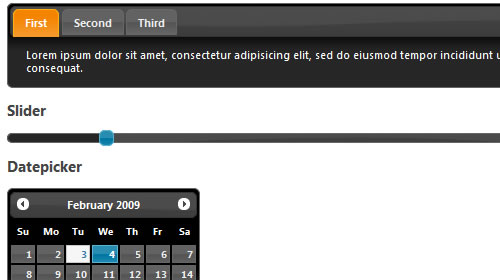
Unfortunately, CSS3 border-radius is only supported by Safari and Firefox, leaving browsers such as Internet Explorer to gracefully degrade to square corners. DD_roundies library offers a new approach to bringing rounded corners to Internet Explorer. DD_roundies works with selectors - much like jQuery - this capability allows for a very convenient mapping to jQuery UI’s CSS Framework classes, and allows us to apply DD_roundies to jQuery UI in a few short lines.
Check out the Demo here
2. Setting Equal Heights with jQuery
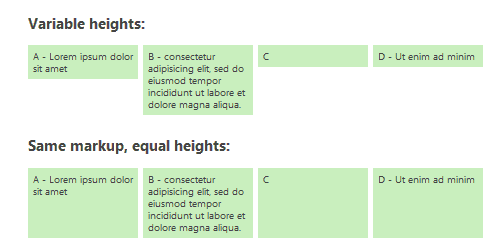
Creating the visual effect of equal-height columns or content boxes has been a challenge. From a usability and performance standpoint, one smart solution is to use a simple JavaScript workaround: our equalHeights() function determines the heights of all sibling elements in a container, and then sets each element’s minimum height to that of the tallest element. When JavaScript is disabled, the boxes or columns appear with varying heights, but the content remains legible and the page is still completely usable.
Check out the Demo here
3. Cross browser text-shadow
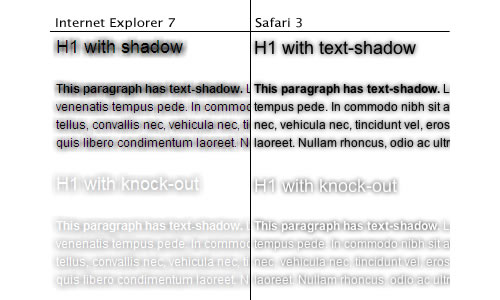
Text-shadow is a neat little CSS3 (actually, CSS2) property that allows you to display a shadow behind your text. The only downfall is that it doesn’t work in Internet Explorer. One handy little thing of Internet Explorer is that it also gives you access to CSS declarations it does not understand, so we can simply request the text-shadow value of a given element and process that. This should work in Internet Explorer 5.5 to Internet Explorer 8.
Check out the Demo here
4. Rounded Corners
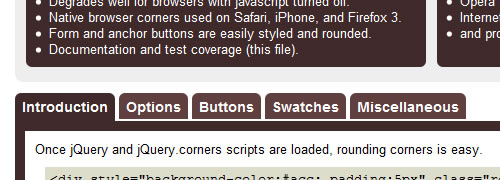
This jQuery plugin will create beautifully rounded corners. No images or obtrusive markup necessary. Support for padding ensures your layout degrades gracefully for users who have disabled javascript.
5. Position Footer
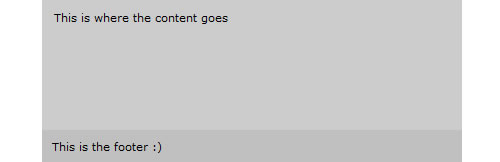
This little plugin will allow you to position a footer at the bottom of the browser viewport when the content doesn’t reach that far. It will not adjust the footer if the content goes below the viewport height.
Check out the Demo here
6. Link Control
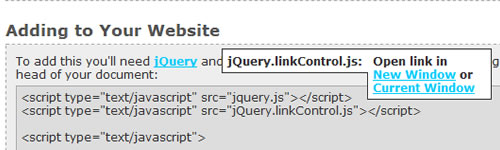
A simple plugin designed to give the end user control over whether they want to open a link in a new window or not without having to right click and such.
Check out the Demo here
7. Page Peel

A jQuery plugin for the page peel ad effect used on quite a few sites now.
Check out the Demo here
8. Delaying loading of images in (long) web pages
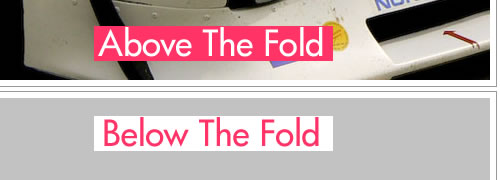
Lazy loader is a jQuery plugin that delays loading of images in (long) web pages. Images outside of viewport (visible part of web page) wont be loaded before user scrolls to them. This plugin specially helps on long web pages containing many large images makes the page load faster. Browser will be in ready state after loading visible images. In some cases it can also help to reduce server load.
Check out the Demo here
9. Preload Images Sequentially With jQuery
This is a small code snippet you can use for preloading images for mouseovers. It uses $(window).bind(‘load’, function() {…}) to wait until all page elements have finished loading. This includes all images.
10. BGIframe
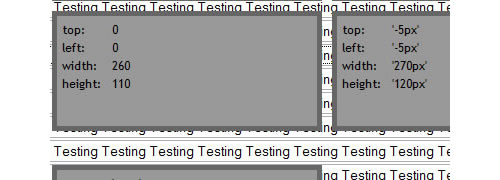
Helps ease the pain when having to deal with IE z-index issues.
11. Fixing IE overflow problem
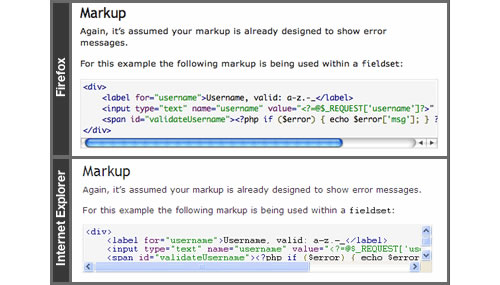
IE has a different implementation of overflow compa(red) to Firefox or Safari. In particular, Firefox et al, when overflowing an element, it puts the horizontal overflow scroll bar on the outside of the element. Because the content overflows horizontally in IE, the new horizontal scroll bar means we can’t see all the content vertically, thus generating a vertical scroll bar.
Vertical overflow is always inside the element, so you need to apply the following in IE only:
- Find all elements whose contents is overflowing horizontally.
- Add 20 pixels of padding to the bottom of our element.
- Strip the vertical scroll bar.
(function ($) {
  $.fn.fixOverflow = function () {
    if ($.browser.msie) {
      return this.each(function () {
        if (this.scrollWidth > this.offsetWidth) {
          $(this).css({ 'padding-bottom' : '20px', 'overflow-y' : 'hidden' });
        }
      });
    } else {
      return this;
    }
  };
})(jQuery);
// usage
$('pre').fixOverflow().doOtherPlugin();
This fix results in IE conforming to putting the horizontal scroll bar below the element.
Check out the Demo here
12. Avoiding CSS hacks using Javascript
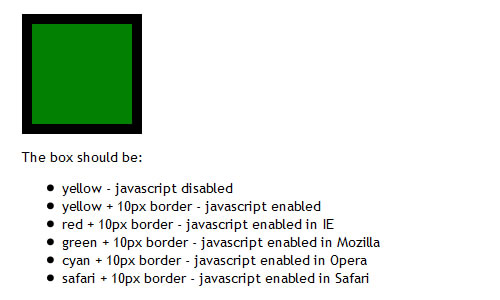
If you don’t have to code those ugly CSS hacks for those browsers that just won’t show you what you want them to, you can use one trick to ease the CSS writing: “Browser selectors”. So now you can preprend your styles with .msie, .mozilla, .opera, .safari or .other depending on the targeted browser.
Check out the Demo here
13. Increase the size of click targets
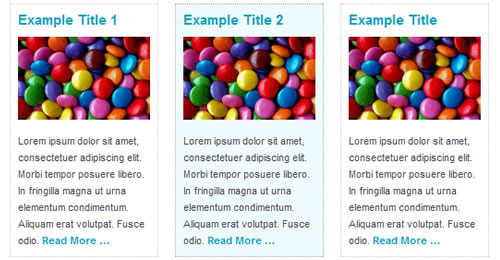
Say goodbye to boring ‘Read More…’ links by turning your entire content block into a clickable target!
Check out the Demo here
14. Vertically Center An Element

In this video tutorial, you will learn how you can vertically center an image in your browser by combining CSS with jQuery’s power
15. JSizes ― jQuery extension plugin for CSS properties
JSizes is a small plugin which adds support for querying and setting the CSS min-width, min-height, max-width, max-height, border-*-width, margin, and padding properties. Additionally it has one method for determining whether an element is visible. In total it adds six new methods to the jQuery element API.
Some examples of how the new methods can be used:
jQuery(function($) {
   var myDiv = $('#myDiv');
   // set margin-top to 100px and margin-bottom to 10em
   myDiv.margin({top: 100, bottom: '10em'});
   // displays the size of the top border in pixels
   alert(myDiv.border().top);
   // displays true if the element is visible, false otherwise
   alert(myDiv.isVisible());
   // set padding-right to 10px and margin-left to 15px using chaining
   myDiv.padding({right: 10}).margin({left: 15});
});
Don’t forget to
subscribe to our RSS-Feed and visit my twitter page : nourayehia to get notified when our next post is here.

A very useful article, thanks!
I have been using DD_Roundies for the past 2 months. Because of it’s use of vector drawing primitives in IE, it’s the most advanced round corner/border radius at this time.
Just be aware that you understand the caveats and limitations (like no rounding of tables or table elements, or select dropdowns)
John McMullen February 3, 2025 @ 6:07 pm
Thanks for the double link love on the Link Control and Page Peel. Great list too. I’ve got to try out that footer one.
Some of those plugins seem really useful!
Sean Delaney February 4, 2025 @ 1:19 am
Very informative. It must have taken you a while to find and put all of these together.
Thanks.
landry February 4, 2025 @ 1:43 am
I think there’s a bug in the demo of dd_roundies : when executed in IE7, corners are effectively rounded, but the tabs don’t change color when clicked
Drew Diller February 4, 2025 @ 12:57 pm
Yeah, I’m working on that one. Simple fix, but I don’t want to put out another release until I’ve addressed some more significant ‘under the hood’ issues.
Great resource. Seen most of these before but DD_roundies is a new one on me.
Lazy load - Delaying loading of images in (long) web pages is very useful
Hi, great post.
But i found mistake in link href in 5. Position Footer.
Thanks for pointing that, just fixed it
nice one with the DD_Roundies, it can avoid invalid CSS too. awesome!
Jonas February 4, 2025 @ 9:15 am
“This should work in Internet Explorer 5.5 to Internet Explorer 8.”
We should give up IE hacks completely. Force people into switching browsers.
Iaman February 4, 2025 @ 12:35 pm
Wow, this is great! I’m (finally) starting to get into the world of using jQuery, so these kinds of things are awesome resources for me!
Jonas:
Now, now, we shouldn’t be forcing people to use certain browsers, we should be campaigning for consistent support by all browsers. We want people to have more legitimately good choices, not lock them in to one or two.
Braxo February 4, 2025 @ 12:42 pm
14: Vertically center an image.
There is a pure CSS solution as well. Give the element and absolute position, move it top negative 50% and left negative 50%. Then give it a margin-top and left of half the elements hight and width.
For text, say in a button with one line of text, give the element a height and set the line-height to be equal to it.
links for 2025-02-04 « Minesa IT February 4, 2025 @ 1:07 pm
[…] 15 jQuery Plugins to Fix and Beautify Browser Issues | DevSnippets (tags: resources development javascript ajax jquery plugins list css crossbrowser) […]
I’m not sure how exactly the footer plug-in works (is the footer at the bottom of the PAGE or ‘stuck’ at the bottom of the browser view port while content goes behind it? ex. http://www.cbcli.com)
There are pure CSS ways to have a footer sit at the bottom of the page, as seen here:
http://ryanfait.com/resources/footer-stick-to-bottom-of-page/
or
http://matthewjamestaylor.com/blog/keeping-footers-at-the-bottom-of-the-page
But if this plug-in is for the footer stuck at the bottom of the browser view port, I don’t know of a CSS-only way to do it without using JavaScript
The jQuery solution is almost similar to the one found here, the only difference is in the jQuery solution you don’t need to specify a height for the footer.
Anyone here might give us another difference, or what is the need of using javascript when we can do it with CSS only.
Lazy load - Delaying loading of images in (long) web pages is very useful.
Bladimir February 4, 2025 @ 4:08 pm
Nice and useful article, finally I found a preloading images sequentially code that actually works!
Thanks.
Daily List - MiT Gr8 1 February 4, 2025 @ 4:43 pm
[…] JQuery Beautification. […]
Some really great jQuery plugins here. I can see how a lot of them are useful.
I do have one question though, doesn’t using Javascript for styling purposes ruin the whole idea of the 3 layers of web design? i.e. (X)HTML = content, CSS = presentation, JS = behaviour.
Steve Firth February 4, 2025 @ 6:45 pm
Nice to have some additions to my jQuery tool box, some nice ways of bringing IE up to spec without busting your hump.
Some more good jQuery stuff « my 2 bits worth February 4, 2025 @ 7:47 pm
[…] 15 jQuery Plugins to Fix and Beautify Browser Issues | DevSnippets […]
links for 2025-02-04 « Mandarine February 4, 2025 @ 9:06 pm
[…] 15 jQuery Plugins to Fix and Beautify Browser Issues | DevSnippets (tags: plugin calendar jquery webdesign webdev tools list) […]
links for 2025-02-04 « Stand on the shoulders of giants February 5, 2025 @ 12:00 am
[…] 15 jQuery Plugins to Fix and Beautify Browser Issues | DevSnippets (tags: tips jquery webdesign resources plugins) […]
Some pretty usefull plugins here. thanx a lot for the collection.
pite February 5, 2025 @ 12:35 am
except for lazy load all of these should really be delt with CSS rather than JS…
John McMullen February 6, 2025 @ 11:55 pm
I’m curious, how would you accomplish the Link Control or Page Peel with CSS?
links for 2025-02-05 | Emrah Sağlık February 5, 2025 @ 1:05 am
[…] 15 jQuery Plugins to Fix and Beautify Browser Issues | DevSnippets (tags: design webdesign web programming jquery) […]
I found a solution to the bug:
In function(out) set:
$(this).css(‘position’,’static’);
Great post - thanks!
links for 2025-02-05 « pabloidz February 5, 2025 @ 5:01 am
[…] 15 jQuery Plugins to Fix and Beautify Browser Issues DevSnippets (tags: jquery) […]
JoeFuture February 5, 2025 @ 7:40 am
It’d be nice if the rounded corners plugin worked well in IE8.
Great post - thanks!!
Avenger February 5, 2025 @ 9:50 am
jquery is like the solution to all the things that frustrate me with web development
Joshua Folkerts February 5, 2025 @ 8:39 pm
Very nice!!!!
trendbender February 6, 2025 @ 7:17 am
thx for good list)
trendbender February 6, 2025 @ 7:18 am
‘Vertically Center An Element’ link is broken
15 jQuery Plugins to Fix and Beautify Browser Issues - Graphic Design Forum and Web Design Forum February 6, 2025 @ 8:25 am
[…] 15 jQuery Plugins to Fix and Beautify Browser Issues 15 jQuery Plugins to Fix and Beautify Browser Issues | DevSnippets […]
Bithalter Webzeuglinks 006′09 | Webzeugkoffer Webdesign February 9, 2025 @ 1:33 am
[…] 15 jQuery Plugins to Fix and Beautify Browser Issues: Hierbei sollte natürlich Progressive Enhancement gelten. Abgerundete Ecken gibt’s offiziell ab CSS3. Insofern dürfte das kein Browser-Fehler sein. […]
David Santos Web Design » Blog Archive » A nice little link about JQuery February 9, 2025 @ 6:52 pm
[…] I came across an article at DevSnippets that discusses ways to fix the terror of a browser that is Internet Explorer using JQuery. It […]
links for 2025-02-10 « Richard@Home February 10, 2025 @ 10:13 pm
[…] 15 jQuery Plugins to Fix and Beautify Browser Issues | DevSnippets A useful selection of jQeury plugins. Of note: Rounded corners & Equal Height columns (tags: jquery plugin) […]
Using jQuery to Style Design Elements: 20 Impressive Plugins | DevSnippets February 11, 2025 @ 7:57 am
[…] know we covered different jQuery posts here but you guys don’t stop asking for more. So here we are again covering more […]
Dagliga tips #05: CSS Framework, 50+ gratis Wordpress tema, PHP tips | Webbrelaterat March 3, 2025 @ 9:33 am
[…] 7.15 jQuery Plugins to Fix and Beautify Browser Issues […]
Crysfel March 5, 2025 @ 11:03 am
nice collection thanks for share
» Bookmarks for March 5th - Michael Zehrer March 6, 2025 @ 3:09 am
[…] 15 jQuery Plugins to Fix and Beautify Browser Issues - Modern browsers have very good support for CSS — it’s certainly good enough for you to use CSS to control layout and presentation. Sometimes however, certain page elements will appear differently in different browsers. That’s why today we wanted to highlight 15 jQuery solutions for the most common browser issues that you’ll encounter when building web applications among other jQuery plugins that will give you a nice browser effect. […]
Jesse Bilsten » Blog Archive » Bookmarks for March 11th through March 12th March 12, 2025 @ 9:24 pm
[…] 15 jQuery Plugins to Fix and Beautify Browser Issues | DevSnippets - […]
“Avoid CSS hacks with Javascript…” Hilarious. CSS “hacks” are used to avoid Javascript.
D’oh! I know tip #1 specifically says “In IE”, but I was hoping it would work for Opera as well. Not so much!
Thanks for the cool list, though. Lots of useful stuff in there. I like #13, BigTarget.js, in particular.
USING JQUERY TO STYLE DESIGN ELEMENTS: 20 IMPRESSIVE PLUGINS | Best Smashing February 21, 2025 @ 4:17 pm
[…] know we covered different jQuery posts here but you guys don’t stop asking for more. So here we are again covering more […]
USING JQUERY TO STYLE DESIGN ELEMENTS: 20 IMPRESSIVE PLUGINS | Oktilyon Teknoliyon February 22, 2025 @ 6:47 pm
[…] know we covered different jQuery posts here but you guys don’t stop asking for more. So here we are again covering more […]